
Link your Blog to a Google+ profile using rel="author"
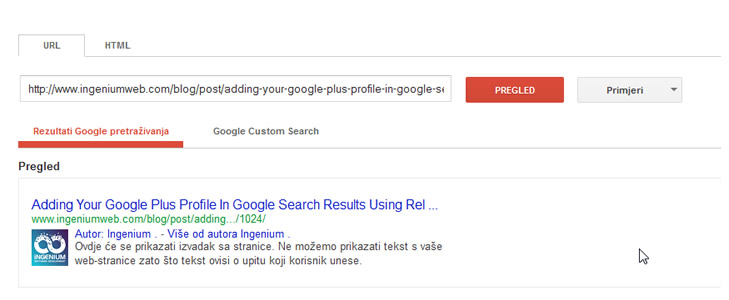
Linking your content to your Google profile is a two-step process. First, you add a link from your website, blog or page to your Google profile. Second, you update your Google profile by adding a link back to your site.
1. Verify authorship of your content
On your Google+ profile, make sure that you have a link pointing back to the site you want the author highlight to work on. Make sure your +1′s are public on your Google+ profile too.<
To be sure as extra step you can visit the Authorship page and submit your email address to the Google. No matter how many articles or posts you publish on this domain, you only need to do this process once. Your email will appear in the Contributor to section of your Google+ profile
2. Link your content to your Google profile
Create a link to your Google profile from your webpage or the blog, like this:
<link href="https://plus.google.com/XXXXXXXXXXXXXX/posts" rel="author" />
Replace the X’s with your Google Plus number — this can be found if you visit Google+ while logged into the system… simply look at your address bar to locate your unique number. Place the code snippet in the <head> tag of the site’s HTML
The impact of visual “social proof” can dramatically increase the click-through rate (CTR, the percentage of those who see your content in search results pages who then click your link) for your posts and pages.
If you want to tie a Google+ business page to an entire website, you can add the rel=publisher tag to your website.


Posted by Ingenium Web

iNGENIUM Ltd. is an software development company from EU which delivers a full range of custom .NET, web and mobile solutions for different business to meet partner's demand.
The Power of Imagination Makes Us Infinite
Related Posts

Every question below came from real users, the kind that show up in forums and support threads over and over. The answers skip the fluff. If you have wondered any of these, read on.


Struggling to get your profile noticed no matter how often you post?

Let’s face it—online shoppers in 2026 are impatient. If a store takes more than a couple of seconds to load, they’re already thinking about the back button.

A business website plays a critical role in how customers discover, evaluate, and interact with a brand.

In the bustling digital realm, the significance of search engine optimization (SEO) for enterprises stands undisputed.









Comments
comments powered by Disqus